
Hardware Marketing Series · Part 12 of 16
Social media and Google Ads are often the first marketing channels hardware stores and lumberyards invest in. They’re also the channels that tend to grow without much structure.
Posts get published. Ads get turned on. Budgets get adjusted when something feels off. Over time, it gets hard to tell which efforts support real business goals and which are simply filling space.
Built with intention, these channels support different parts of the customer journey. Social media builds awareness and familiarity. Google Ads capture intent when customers are ready to act.
This guide shows how to build social media and Google Ads that are realistic, measurable and aligned with your goals, your channel audit and how hardware stores and lumberyards actually operate.
This guide is Part 12 of our 16-part hardware marketing series. Each article walks through one step in building a connected marketing strategy for independent hardware stores and lumberyards, from organizational clarity to a complete marketing system built for long-term growth.
Free template · Step 12 of 16
Social Media and Google Ads Plan Template
This template helps you:
- Define clear goals for each channel
- Build content pillars tied to real priorities
- Map ad campaigns to departments and services
- Align messaging across platforms
- Track results more effectively
Why Social Media and Google Ads Should Be Built Together
Social media and Google Ads do different jobs. They work best when those roles are clear.
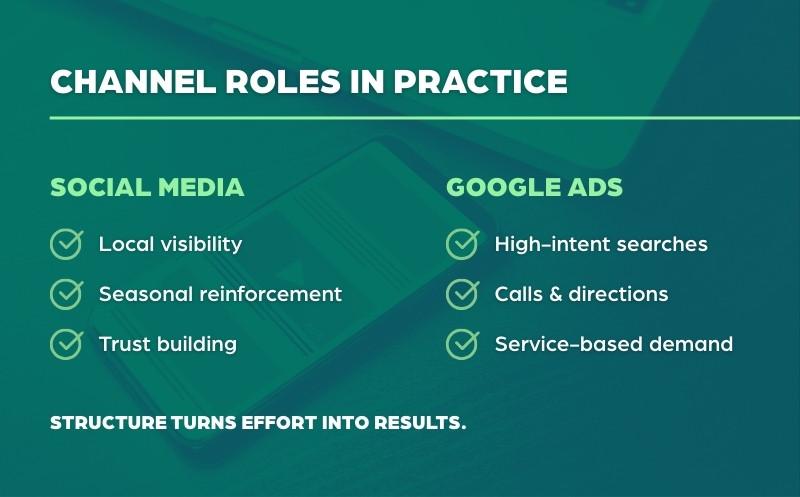
Social media helps you:
- Stay visible in your community
- Reinforce what your store is known for
- Support seasonal planning
- Build familiarity before a purchase
Google Ads help you:
- Show up when customers are searching
- Capture high-intent local demand
- Drive calls, directions and visits
- Support priority services and categories
When these channels are disconnected, social feels active but hard to measure, ads get clicks without context and results feel inconsistent. When they’re aligned, messaging stays consistent, priorities are clearer and performance is easier to evaluate.
Step 1: Define One Clear Role for Each Channel
A common mistake is trying to make every channel do everything. Each channel should have a specific job.
Common social media goals
- Increase local awareness
- Highlight departments and services
- Support seasonal projects
- Stay visible with contractors
Common Google Ads goals
- Capture ready-to-buy searches
- Drive phone calls and directions
- Promote high-priority services
- Support peak seasons
If a goal doesn’t fit the channel, it usually doesn’t perform well. Clarity here makes every other decision easier.
Step 2: Build Your Social Media Foundation First
Before running ads, your social presence needs structure. Start with three to five content pillars that reflect how your store actually operates. Common pillars include:
- Seasonal prep and project tips
- New arrivals and practical product highlights
- Services like key cutting, repairs or delivery
- Contractor materials and solutions
- Community events and local involvement
Social content should be helpful, familiar and consistent. It doesn’t need to be perfect. It needs to be steady.
Mojo Note: Consistency matters more than volume. A realistic posting schedule is easier to maintain and easier to build on. If you need help defining content pillars or a posting schedule you can keep up with, start with How to Build a Social Media Plan (Part 10), which includes a free Social Media Plan Template.
Step 3: Set Up Google Ads With Intent in Mind
Google Ads work best when they’re simple and focused. For most hardware stores and lumberyards, that means starting with Search campaigns, grouping ads by clear themes and matching landing pages to the search.
High-intent search themes often include:
- Hardware store near me
- Lumber and building materials
- Delivery and rental services
- Repairs and in-store services
- Seasonal equipment
Tracking is essential. Track phone calls, direction requests and form submissions. Without tracking, it’s hard to know which campaigns are driving real growth.
Step 4: Align Messaging Across Both Channels
Social media and Google Ads should reinforce the same priorities. Start with a shared message framework: your priority categories and services, what your store is known for, seasonal focus areas and clear calls to action.
Social media introduces the message. Google Ads reinforce it at the moment of search. That alignment makes marketing feel intentional instead of scattered.
Step 5: Set a Realistic Budget and Review Cadence
Each channel plays a different role. Social media is always on and focused on visibility and trust. Google Ads stay on for core searches and ramp up during peak demand.
A simple review cadence helps: a weekly check on calls and searches, a monthly performance review and seasonal planning adjustments. This prevents last-minute changes and keeps decisions proactive. (We’ll go deeper on budgeting in Part 15.)
What This Looks Like in Practice
Without alignment, social posts are created ad hoc, ads target broad or generic audiences, messaging changes from channel to channel and results are hard to explain. Marketing feels busy, but direction is unclear.
With alignment, social content is built around clear pillars, Google Ads are tied to real departments, services or categories, messaging is consistent across paid and organic channels, and performance is easier to measure and adjust.
For example, if contractor services are a priority:
- Social content reinforces reliability, availability and expertise.
- Google Ads focus on service-based and local-intent searches.
- Landing pages match the message customers saw in the ad or post.
Each channel supports the same goal instead of competing for attention. The difference isn’t effort. It’s structure.
Download the Social Media and Google Ads Plan Template
To help you put this into action, we’ve created a free Social Media and Google Ads Plan Template built specifically for hardware stores and lumberyards.
Free template · Step 12 of 16
Social Media and Google Ads Plan Template
This template helps you:
- Define clear goals for each channel
- Build content pillars tied to real priorities
- Map ad campaigns to departments and services
- Align messaging across platforms
- Track results more effectively
Build Demand and Capture Intent
Social media builds familiarity and trust. Google Ads capture intent when timing matters. When both channels have clear roles and shared priorities, marketing is easier to manage and easier to measure. It’s the approach we use at Mountain Mojo Group to help hardware stores and lumberyards grow with clarity, not chaos.
In the next guide, we’ll cover how to build an email newsletter that keeps customers coming back.
Want help applying this to your store?
A short discovery call can help you build or refine this system for your store.
The Hardware Marketing Series
This article is part of our complete marketing strategy framework for independent hardware stores, lumberyards, farm stores and ag stores, including retailers affiliated with Ace Hardware, True Value and Do it Best, and suppliers such as Orgill. Work through all 16 steps to build your strategy in a structured, intentional way. See the full series.
- How to Create Organizational Goals for Your Hardware Store
- How to Create Revenue Goals
- How to Perform a Market Share & Competitive Analysis
- How to Create Customer Surveys
- How to Define Mission, Vision & Core Values
- How to Audit Your Branding
- How to Create Target Personas with Shopping Behaviors
- How to Audit Social Media, Google Ads & SEO
- How to Build & Maintain Your Google Business Profile
- How to Build a Social Media Plan
- How to Build an SEO Strategy
- How to Build Social Media & Google Ads Campaigns (you’re here)
- How to Build an Email Newsletter
- How to Build a Content Calendar
- How to Build a Marketing Budget
- How to Build a Holistic Marketing Strategy